What Really Happens When You Run a Program?
A plain-English walkthrough of how the OS turns a file into a process, gives it memory, runs it on the CPU, and still keeps control.
A program sitting on disk is not alive yet.
It may contain valid machine instructions, static data, library information, and an entry point. But until the operating system gives it memory, a process identity, CPU time, and a way to talk to the outside world, it is just bytes in a file.
The useful question is not “how does the CPU run code?” It is:
How does the OS make a dead file feel like a live program?
The answer explains processes, virtual memory, system calls, scheduling, and why your program can run fast without being allowed to take over the machine.
The short version
When you run:
./server
something close to this happens:
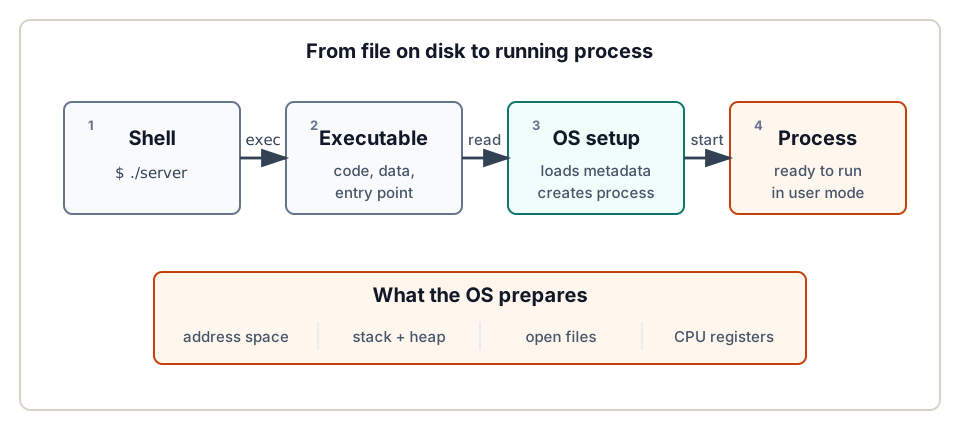
- A shell or another parent program asks the OS to run the executable.
- The OS creates a new process record.
- The OS builds a virtual address space for the process.
- The executable’s code and static data are loaded or mapped into that address space.
- The OS prepares the stack, heap, command-line arguments, environment, and open files.
- The CPU registers are initialized so execution begins at the program’s entry point.
- The program runs in user mode until it exits, blocks, makes a system call, or gets interrupted.
That is the simple version. The rest of the article fills in what those steps mean.
Program versus process
A program is the passive thing: the executable file. A process is the active thing: the program while it is running.
OSTEP makes this distinction early because it explains almost everything else. The OS does not just “open a file and run it.” It creates an abstraction. The process has machine state:
- memory the process can address
- registers, including the program counter and stack pointer
- open files and other I/O state
- a process ID
- a current state, such as ready, running, or blocked
That distinction explains why you can run the same program twice. Two terminal windows can run vim, node, or python at the same time. The executable file may be the same, but the processes are different. Each one has its own process ID, registers, stack, heap, file state, and scheduling history.
Who asks the OS to start it?
Usually another process asks. On a Unix-like system, your shell is itself just a user program. When you type:
wc notes.txt
the shell parses the command and asks the OS to create a child process. In the classic Unix model described in OSTEP, this happens with fork() and exec():
fork()creates a new child process that starts as a near-copy of the parent.exec()replaces the child process’s current program image with a different program.wait()lets the parent shell wait until the child finishes.
That split looks odd the first time you see it. Why not one call called run()?
Because the gap between fork() and exec() is useful. The child can change its file descriptors before the new program starts. That is how shells implement redirection and pipes. For example, in:
grep error app.log | wc -l
the shell can connect one child’s output to a pipe and another child’s input to the same pipe before both children call exec().
Other operating systems expose different APIs. Windows has CreateProcess(), for example. The interface differs, but the underlying job is the same: create a process and prepare it to run a program.
Loading does not always mean copying everything
The beginner-friendly version says:
The OS loads the program into memory.
That is fine as a first model, but modern systems are often lazier and more efficient.
An executable has sections: code, read-only data, initialized data, and metadata that tells the OS and loader how the program should be arranged. The OS uses that information to create the process’s address space. Some bytes may be read immediately. Many pages may be mapped first and brought into physical memory only when the program touches them.
OSTEP calls this lazy loading. Early or simple systems might load all needed code and data before running the program. Modern systems can defer work until a page is actually needed. The program still sees a normal address space. The laziness is an implementation detail hidden behind virtual memory.
That is a recurring OS theme: give the program a clean illusion, then use hardware and kernel mechanisms to make it efficient.
The address space is the process’s private map
When a program runs, it uses addresses constantly. It fetches instructions, reads variables, writes stack frames, follows pointers, and allocates heap objects. Those addresses are virtual addresses.
The process acts as if it has a private memory map. It does not know where the bytes really live in physical RAM. The OS and hardware translate virtual addresses to physical addresses. This is what lets the OS run many processes at once without letting them casually read and overwrite each other’s memory.
A simple process address space looks like this:
high addresses

  stack
    |
    v

  unused / mapped regions

    ^
    |
  heap

  static data
  code / text

low addresses
The exact layout varies by OS, CPU architecture, executable format, security settings, dynamic linking, and randomization. Do not memorize the drawing as a universal map. Keep the idea: the process gets a private virtual address space containing its code, data, heap, stack, and mapped regions.
Before your code runs
Before the program’s own code starts, the OS and language runtime need to arrange the first moments of execution.
For a C program, OSTEP explains this with main(argc, argv): the OS allocates stack space and initializes it with command-line arguments. In a real modern system, execution usually begins at an entry point supplied by the executable and runtime startup code. That startup code prepares the language environment and then calls your main, main.main, top-level module code, or equivalent.
So when people say “the OS starts at main,” treat it as a useful simplification. The precise version is:
The OS starts the process at the executable’s entry point; runtime startup code eventually calls the program entry function you wrote.
Memory is not the whole process either. The OS also gives the process an I/O environment. On Unix-like systems, a new command usually starts with three familiar file descriptors:
0: standard input1: standard output2: standard error
They might point to your terminal, a file, or a pipe. The program often does not care. It just reads from descriptor 0 and writes to descriptors 1 and 2.
Starting the CPU
At some point, setup ends and execution begins.
The OS initializes the saved register state for the process. The important register is the program counter, also called the instruction pointer on some CPUs. It tells the CPU which instruction to execute next. The OS sets it to the program’s entry point.
Then the process is placed in the ready state. When the scheduler chooses it, the OS restores its registers, switches to user mode, and lets it run.
This is where OSTEP’s phrase “limited direct execution” is helpful.
The program runs directly on the CPU. That is the “direct execution” part. The OS does not interpret every instruction one by one. But execution is limited: user code cannot execute privileged instructions, directly control devices, or overwrite kernel memory.
System calls: asking the OS to do privileged work
Suppose your program calls:
read(fd, buf, n);
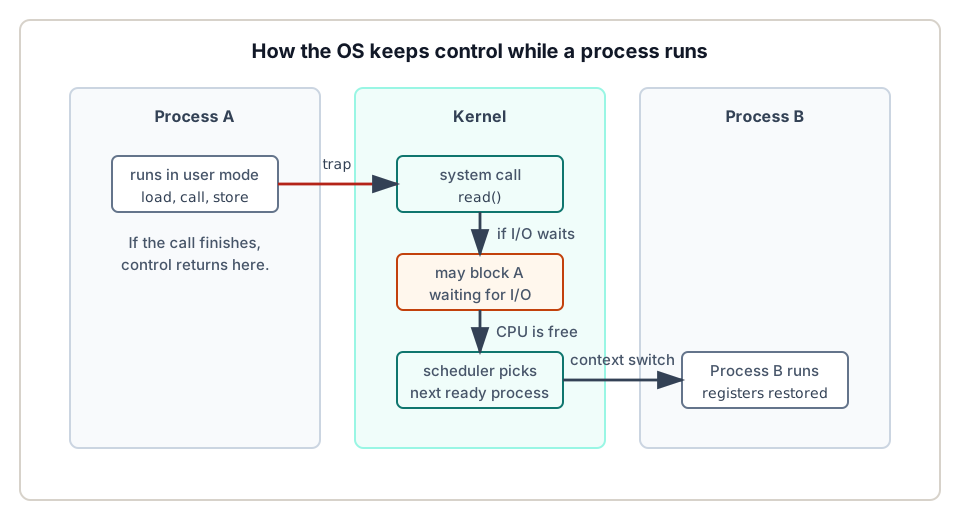
The function call in your C library is not magic by itself. It eventually uses a special CPU instruction to trap into the kernel. That trap changes the CPU from user mode to kernel mode and jumps to a known kernel handler.
The kernel checks the request:
- Is this a valid system call?
- Is the file descriptor valid?
- Does the process have permission?
- Is the user buffer address safe to read or write?
- Can the operation complete now, or must the process block?
If the read can complete immediately, the kernel copies data as needed, sets the return value, and returns to user mode. If the read must wait for disk, network, terminal input, or a pipe, the kernel marks the process as blocked and runs something else.
That blocked state is not a failure. It is how the OS avoids wasting CPU time while a process waits for slow I/O.
The scheduler decides who runs next
At any moment, a process can be:
- running: currently executing on a CPU
- ready: able to run, but not chosen right now
- blocked: waiting for some event, such as I/O completion
The scheduler decides which ready process runs next.
OSTEP separates mechanism from policy here. The mechanism is the low-level ability to stop one process and resume another. The policy is the decision about which process should run.
A context switch is the mechanism. The OS saves the current process’s registers into its process structure and restores another process’s registers. After that, the CPU continues as if the other process had just returned from the kernel.
That sentence is worth sitting with. A process can be paused in the middle of a function and resumed later without knowing. Its registers, stack, program counter, and address space make that possible.
How the OS gets control back
There is an obvious problem with direct execution:
If the OS lets a program run directly on the CPU, how does the OS regain control?
There are two main paths.
First, the program voluntarily enters the kernel with a system call. Reading a file, writing to the network, creating a process, allocating certain kinds of memory, and exiting all involve OS services.
Second, hardware interrupts can force control back to the kernel. The important one for scheduling is the timer interrupt. The OS programs a timer device to interrupt periodically. When the timer fires, the CPU enters the kernel, and the OS gets a chance to decide whether the current process should continue or another ready process should run.
This is why a normal user program cannot just keep the CPU forever on a general-purpose OS. It may run for a time slice, but the timer interrupt gives the OS a non-cooperative way to regain control.
What happens on exit
Eventually the program finishes or is killed.
It might return from its main function, call exit(), crash on an invalid memory access, receive a signal, or be terminated by another process. Either way, the OS cleans up:
- memory mappings are released
- open file references are closed
- kernel bookkeeping is updated
- the exit status is saved for the parent to collect
On Unix-like systems, a finished child process can briefly remain as a zombie. That just means the process has exited and no longer runs, while the OS keeps a small record so the parent can call wait() and learn how it ended.
A tiny command, end to end
Take this command:
cat notes.txt
A compact end-to-end story looks like this:
- The shell reads the line
cat notes.txt. - The shell creates a child process.
- The child arranges any needed file descriptors.
- The child calls
exec()to become thecatprogram. - The OS builds the new program image: code, data, heap, stack, arguments, environment, and register state.
- The scheduler eventually runs the process.
catasks the OS to open and readnotes.txt.- If disk I/O is needed,
catblocks and another process can run. - When data is available,
catbecomes ready again. catwrites bytes to standard output.catexits.- The shell collects the exit status and prints the next prompt.
That list is the point. A tiny command touches process creation, virtual memory, scheduling, system calls, file descriptors, and exit handling.
Common misunderstandings
“The program is copied fully into RAM before it starts.”
Sometimes a simple model says that, but modern systems often load lazily. The address space is prepared up front; physical memory may be filled on demand.
“The OS runs my program line by line.”
Usually no. The CPU executes your program’s machine instructions directly in user mode. The OS gets involved on system calls, interrupts, exceptions, scheduling, and memory-management events.
“Every process has its own physical memory.”
It has its own virtual address space. Physical pages can be shared, mapped from files, copy-on-write, swapped, or allocated on demand. The private-address-space illusion is what the process sees.
“A process starts exactly at main.”
That is a teaching shortcut. The OS starts at the executable entry point. Runtime startup code calls the language-level entry function.
“If a process is not running, it is dead.”
No. It may be ready and waiting for CPU time, or blocked waiting for I/O.
The useful mental model
When you run a program, the OS does three big things:
- It builds a private world: address space, stack, heap, files, arguments, and process metadata.
- It lets the program run fast: direct execution on the CPU in user mode.
- It keeps control: system calls, traps, interrupts, scheduling, and memory protection.
That balance is the heart of operating systems. Your program gets the feeling of a private machine, but the OS keeps the real machine shared, protected, and recoverable.
Fact check
This article is mainly based on Operating Systems: Three Easy Pieces:
- Chapter 4, “The Abstraction: The Process”, for the definition of a process, process state, process creation, loading, stack setup, heap setup, and default I/O setup.
- Chapter 5, “Interlude: Process API”, for
fork(),exec(),wait(), shell behavior, redirection, pipes, and the point that successfulexec()transforms the current process image rather than creating a new process by itself. - Chapter 6, “Mechanism: Limited Direct Execution”, for user mode, kernel mode, traps, timer interrupts, and context switching.
- Chapter 13, “The Abstraction: Address Spaces”, for virtual addresses, private address spaces, memory virtualization, and protection.