How to Create an AI Agent: A Calendar Planning Example
A beginner-friendly guide to creating AI agents with LangGraph and the OpenAI API, using a calendar planning system as the example workflow.
AI agents become easier to understand when you stop imagining them as magic.
The useful version is more ordinary: a goal, a few steps, some shared state, one or two model calls, clear stop conditions, and a human review point before anything important changes. LangGraph is good for this because it lets you describe the work as a graph instead of hiding everything inside a chat loop.
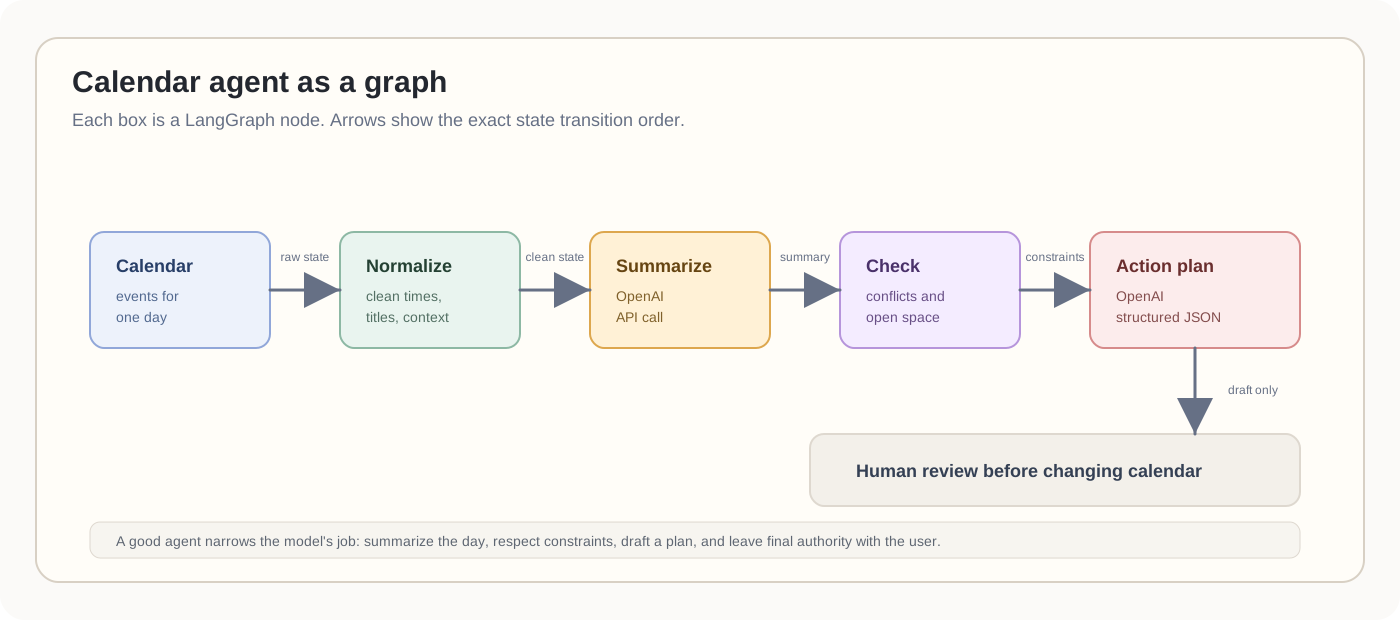
In this post, let us build a simple AI agent with a calendar system as the example. The agent reads one day of calendar events, summarizes the day, and drafts an action plan.
The goal is not to create an assistant that takes over your life. The goal is to turn a messy day into a short plan you can actually use.
What is an AI agent?
For beginners, an AI agent is a program that uses a model to help decide what to do next.
A normal API call is usually one step:
question -> model -> answer
An agent has more structure:
goal -> observe context -> decide next step -> use tools or code -> update state -> continue or stop
That does not mean the agent must be fully autonomous. In many real products, the best agent is only partly autonomous. It can read context, reason about it, draft a plan, and ask the user before doing anything risky.
For a calendar planning agent, the model should not be allowed to randomly move meetings around. A safer first version can do this:
- read the user’s calendar for a day
- summarize what the day looks like
- identify pressure points, conflicts, or open focus time
- draft an action plan
- ask the user before changing the calendar
That is still an agent because it has a goal, state, model reasoning, and a workflow. It is just designed with guardrails.
The simplest way to think about it:
An AI agent is a workflow where the model helps make decisions, but the software still defines the boundaries.
Why LangGraph here?
You can call the OpenAI API directly from a script. For many tasks, that is enough.
LangGraph becomes useful when the work has state and stages:
- load the calendar
- normalize event data
- summarize the day
- check constraints
- build an action plan
- ask a human before writing back to the calendar
That shape is a workflow. Some steps are plain code. Some steps call the model. Some steps may branch. A graph makes those boundaries visible.
LangGraph’s own docs describe it as a low-level orchestration framework for stateful, long-running agents and workflows. That is the right mental model. Do not use it because “agent” sounds exciting. Use it when you want control over state, edges, retries, and review points.
The example state
Start with the state. This is the object each node can read from and update.
from typing import TypedDict


class PlannerState(TypedDict, total=False):
    date: str
    events: list[dict]
    day_summary: str
    focus_blocks: list[str]
    risks: list[str]
    action_plan: list[dict]
This is intentionally simple. The graph should not start with cleverness. It should start with a clear contract for what flows between steps.
The graph skeleton
Here is the shape of the workflow:
from langgraph.graph import StateGraph, START, END


def load_calendar(state: PlannerState) -> PlannerState:
    return {
        "events": fetch_calendar_events(state["date"])
    }


def normalize_events(state: PlannerState) -> PlannerState:
    events = []
    for event in state["events"]:
        events.append({
            "title": event["title"].strip(),
            "start": event["start"],
            "end": event["end"],
            "attendees": event.get("attendees", []),
            "location": event.get("location", ""),
            "notes": event.get("notes", ""),
        })
    return {"events": events}


builder = StateGraph(PlannerState)
builder.add_node("load_calendar", load_calendar)
builder.add_node("normalize_events", normalize_events)
builder.add_node("summarize_day", summarize_day)
builder.add_node("build_plan", build_plan)

builder.add_edge(START, "load_calendar")
builder.add_edge("load_calendar", "normalize_events")
builder.add_edge("normalize_events", "summarize_day")
builder.add_edge("summarize_day", "build_plan")
builder.add_edge("build_plan", END)

calendar_agent = builder.compile()
The two missing functions, summarize_day and build_plan, are where we call the OpenAI API.
Calling OpenAI from a LangGraph node
I like keeping model calls inside normal Python functions. A node should do one job, return a state update, and be easy to test with a fake response.
For the summary step, ask for structured output. The OpenAI Responses API supports JSON schema output, which is a better fit than asking the model to “please return JSON” and hoping for the best.
import json
from openai import OpenAI


client = OpenAI()


def summarize_day(state: PlannerState) -> PlannerState:
    response = client.responses.create(
        model="gpt-5",
        input=[
            {
                "role": "system",
                "content": (
                    "You summarize calendar events for planning. "
                    "Be concise. Do not invent meetings or deadlines."
                ),
            },
            {
                "role": "user",
                "content": json.dumps({
                    "date": state["date"],
                    "events": state["events"],
                }),
            },
        ],
        text={
            "format": {
                "type": "json_schema",
                "name": "calendar_day_summary",
                "strict": True,
                "schema": {
                    "type": "object",
                    "additionalProperties": False,
                    "properties": {
                        "day_summary": {"type": "string"},
                        "focus_blocks": {
                            "type": "array",
                            "items": {"type": "string"},
                        },
                        "risks": {
                            "type": "array",
                            "items": {"type": "string"},
                        },
                    },
                    "required": ["day_summary", "focus_blocks", "risks"],
                },
            }
        },
    )

    parsed = json.loads(response.output_text)
    return {
        "day_summary": parsed["day_summary"],
        "focus_blocks": parsed["focus_blocks"],
        "risks": parsed["risks"],
    }
This node does not decide the whole day. It only turns calendar evidence into a compact summary.
That is an important distinction. Smaller model jobs are easier to validate.
Building the action plan
The next node can use the summary and the original events. It should produce a draft plan, not silently edit the calendar.
def build_plan(state: PlannerState) -> PlannerState:
    response = client.responses.create(
        model="gpt-5",
        input=[
            {
                "role": "system",
                "content": (
                    "You create practical daily action plans from calendar data. "
                    "Respect fixed meetings. Prefer fewer, clearer actions."
                ),
            },
            {
                "role": "user",
                "content": json.dumps({
                    "date": state["date"],
                    "events": state["events"],
                    "summary": state["day_summary"],
                    "focus_blocks": state["focus_blocks"],
                    "risks": state["risks"],
                }),
            },
        ],
        text={
            "format": {
                "type": "json_schema",
                "name": "daily_action_plan",
                "strict": True,
                "schema": {
                    "type": "object",
                    "additionalProperties": False,
                    "properties": {
                        "action_plan": {
                            "type": "array",
                            "items": {
                                "type": "object",
                                "additionalProperties": False,
                                "properties": {
                                    "time": {"type": "string"},
                                    "action": {"type": "string"},
                                    "reason": {"type": "string"},
                                    "calendar_change_required": {"type": "boolean"},
                                },
                                "required": [
                                    "time",
                                    "action",
                                    "reason",
                                    "calendar_change_required",
                                ],
                            },
                        }
                    },
                    "required": ["action_plan"],
                },
            }
        },
    )

    return {
        "action_plan": json.loads(response.output_text)["action_plan"]
    }
Now you can run the graph:
result = calendar_agent.invoke({
    "date": "2026-06-01"
})

for item in result["action_plan"]:
    print(f'{item["time"]}: {item["action"]}')
In a real app, fetch_calendar_events would call Google Calendar, Microsoft Graph, or an internal calendar service. Keep that integration outside the model. The model should receive the calendar facts; it should not be responsible for fetching them unless you explicitly add a calendar tool and permission model.
Where this becomes an agent
The example above is closer to a workflow than a fully autonomous agent. That is fine.
A more agentic version might add tools:
- find free slots
- inspect task manager due dates
- draft a calendar hold
- ask for approval
- write the approved change back to the calendar
The key phrase is “approved change.” Calendar writes are user-impacting. The agent can draft them, but the user should approve them.
Best practices
Here are the rules I would keep even for a small agent.
First, keep the graph boring. A node should have a clear job. If a node loads data, it should load data. If it summarizes, it should summarize. If it writes to an external system, make that obvious in the graph.
Second, use structured output for handoffs between nodes. Plain prose is fine for the final user-facing explanation, but internal state should be typed and validated.
Third, do not give the model more authority than the feature needs. A calendar planning agent can draft an action plan without being allowed to delete meetings, message attendees, or reschedule calls.
Fourth, preserve the evidence. Store the event IDs or calendar references used to create the plan. When the model says “prepare for the design review,” the UI should be able to show which meeting caused that suggestion.
Fifth, make uncertainty visible. A useful plan might say, “There is no travel buffer before the 3 PM meeting” or “The morning has meetings but no obvious focus block.” That is better than a confident but fake plan.
Sixth, add a real review step before side effects. The more personal the data, the more explicit the approval should be.
Seventh, test nodes separately. You should be able to run normalize_events without the model, test summarize_day with a fixture calendar, and test build_plan against a known JSON schema.
Eighth, log state transitions, not private payloads. In production, you want to know that summarize_day ran and returned three risks. You may not need to log every meeting title and note.
A good first version
The first useful version of this agent does not need memory, vector search, five tools, or a complex planner.
It needs to do this well:
- read a day of calendar events
- summarize what the day is really about
- find pressure points
- draft a practical action plan
- ask before changing anything
That is enough to be useful. More importantly, it is understandable. You can point to the graph and explain what happened.
Final thought
Agents are not better because they are more autonomous. They are better when they turn fuzzy work into a reliable workflow.
LangGraph gives you the control flow. The OpenAI API gives you the reasoning and structured output. Your job is to keep the boundary clear: what is code, what is model judgment, and what still belongs to the human.
References: LangGraph docs on overview, workflows and agents, and Graph API; OpenAI docs on the Responses API and Structured Outputs.