Redis Big Key Outage Took Down a Microservice System
A Redis big key outage case study: how one growing key caused slow reads, Redis timeouts, queued requests, database fallback load, and cascading failure.
A Redis outage is not always caused by Redis being down.
Sometimes Redis is alive, accepting connections, and returning results. The problem is that one request path has quietly become expensive enough to slow everything behind it. In a microservice architecture, a Redis big key can spread latency through worker pools, connection pools, retry loops, and database fallbacks until the symptom looks nothing like the cause.
This is a Redis big key outage case study for engineers and SREs: one very large key kept growing, made reads slower, queued more requests, triggered Redis timeouts, and pushed load back to the database.
Redis big key outage: what happened
The first signal was ordinary: services started reporting Redis timeouts. A few endpoints became slow. Database load climbed. Retries increased. Some pods looked CPU-bound, but not all of them. Redis was not obviously unavailable.
That made the incident hard to read. The system looked like it had many problems:
- Redis commands were timing out from application clients.
- Request queues were growing in services that depended on cached data.
- Database traffic increased because cache reads failed or timed out.
- More requests retried the same slow path, making the queue longer.
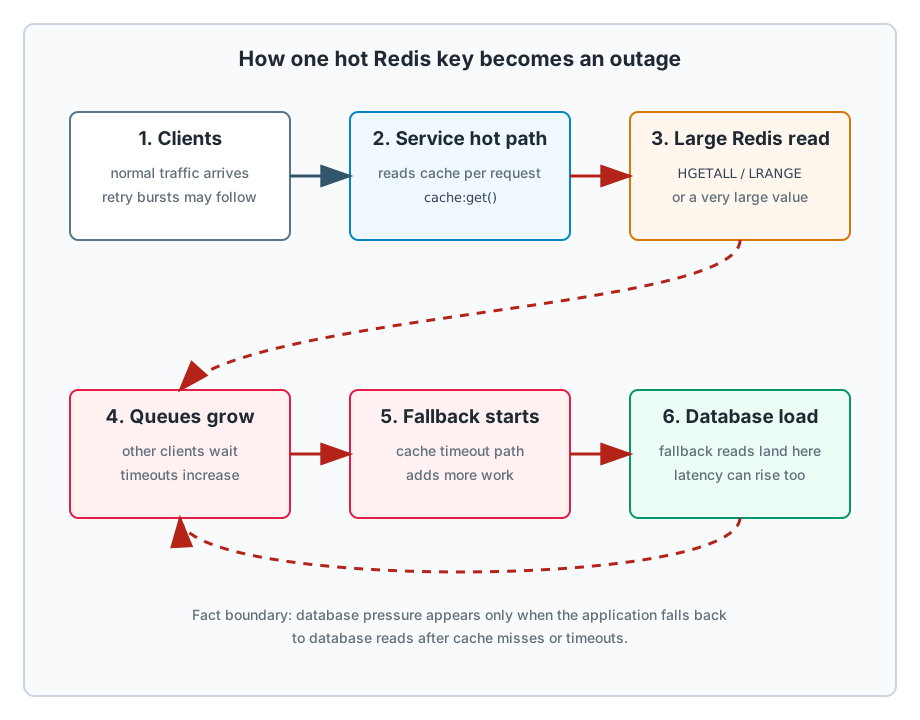
The root cause was smaller and stranger: a single cache key had become much larger than expected. It was read frequently. Each read forced Redis to spend more CPU time executing the command and more time moving a large response back to clients. As traffic rose, the slow read did not stay isolated. It delayed other work and helped take the system down.
Why one Redis key can hurt so much
Redis is fast because most common operations are simple in-memory operations. But Redis command execution is mostly single-threaded per server process. When one command takes a long time to execute, other clients wait behind it.
This is not folklore. Redis documents the latency model directly: because commands are served by a single thread, a slow request makes other clients wait. The docs also call out commands that operate on many elements as a latency risk and recommend checking command complexity before using unfamiliar commands.
The exact danger depends on the data type and command:
GETis constant-time from Redis’ command-complexity point of view, but a huge string still means a huge reply and client-side parse/deserialization cost.HGETALLisO(N)whereNis the size of the hash.LRANGEisO(S+N), whereNis the number of returned list elements.SMEMBERS,ZRANGE, large JSON reads, and similar “give me the whole object” commands have the same operational smell.
So the better question is not “is Redis up?” It is:
Are we asking Redis to return more data than this request path can afford?
Why Redis timeouts were difficult to debug
The obvious dashboards can be misleading.
Average Redis latency may look acceptable while a small set of commands creates a long tail. CPU may rise, but Redis can still respond to health checks. Application logs may show only timeout errors, not the key size. The database may look like the failing component because it receives the fallback load after cache failures.
SLOWLOG helps, but it is not the whole story. Redis slow log records command execution time inside Redis. It does not include network I/O or talking with the client. For large replies, the application can see worse latency than slowlog suggests because the cost continues after command execution: reply transfer, client buffering, decoding, allocation, and downstream processing.
That is why the incident can remain hidden even when the team already knows Redis errors and timeouts are happening.
How to find big keys in Redis safely
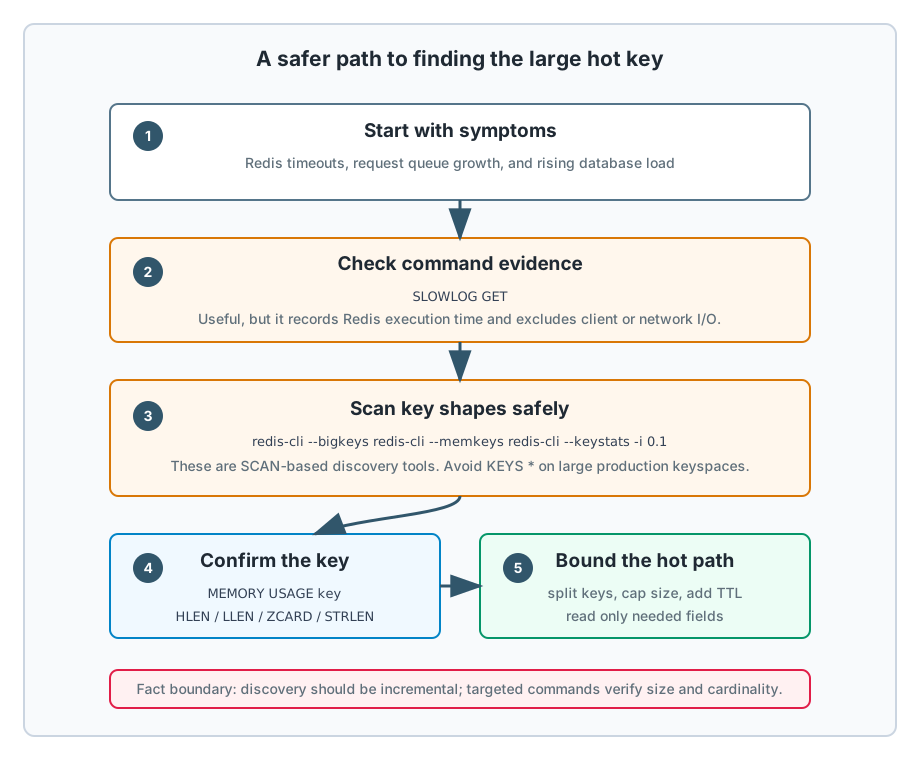
During an incident, avoid expensive discovery commands that make the system worse. In particular, do not run KEYS * in production. Redis marks KEYS as a dangerous O(N) command, and its latency guide calls it a common source of production latency.
Use incremental and targeted checks:
redis-cli --bigkeys
redis-cli --memkeys
redis-cli --keystats
These modes use SCAN under the hood and are designed for inspecting large keyspaces more safely than KEYS. On a hot production instance, use the sleep option to reduce pressure:
redis-cli --keystats -i 0.1
Then confirm suspected keys directly:
TYPE cache:example
MEMORY USAGE cache:example
HLEN cache:example
LLEN cache:example
ZCARD cache:example
STRLEN cache:example
Correlate that with application evidence:
- Which endpoint reads the key?
- How many times is it read per request?
- Does the client fetch the whole value and filter locally?
- Does timeout fallback hit the database?
- Are retries multiplying the same slow call?
The key finding in a Redis big key incident is usually not just “this key is large.” It is “this key is large, hot, growing, and read with an unbounded command.”
How the Redis timeout cascade happened
The failure pattern usually looks like this:
- A cache value grows beyond the size assumed by the original design.
- A common request path reads the full value.
- Redis spends more time executing or serving the large response.
- Client-side Redis calls wait longer and start timing out.
- Service worker pools and connection pools queue requests.
- Fallback logic or cache misses increase database traffic.
- Retries amplify the same path.
- The system reports many downstream failures, even though the trigger is one data shape.
Microservices make a Redis big key outage worse because each boundary has its own timeout, queue, retry policy, and resource pool. Once the slow cache read crosses those boundaries, the system starts failing by amplification instead of by one clean error.
How to fix a Redis big key outage
The immediate mitigation is to stop reading the large value on the hot path.
Depending on the data model, that can mean:
- Delete or rebuild the bad key if it is safe to regenerate.
- Split the value into smaller keys by tenant, user, page, bucket, or time window.
- Replace whole-object reads with bounded reads such as
HGET,HMGET, paginatedZRANGE, or smallLRANGEwindows. - Add a TTL or size cap so the key cannot grow forever.
- Move aggregation to a background job and store bounded query results.
- Disable retries on timeout paths that are already saturated.
- Protect the database with circuit breakers, request coalescing, and bulkheads.
The durable fix is a cache contract. A Redis key should have an owner, an expected maximum size, a TTL policy, and known read commands. If the key can grow without bound, it should not be read as one object in a latency-sensitive path.
How to prevent Redis big key outages
Good Redis monitoring is not only instance-level. Add key-shape and command-shape visibility:
- Redis command latency by command and caller.
- Slow log entries with command names and safe key patterns.
- Top keys by memory and cardinality from scheduled
--keystatsor sampled checks. - Client-side timeout rate and pool wait time.
- Cache fallback rate to the database.
- Database traffic labeled by cache-hit, cache-miss, and cache-timeout paths.
- Payload sizes returned from Redis clients, where the client library allows it.
Also add alerts for growth, not only for failure. A key that doubles every few hours is easier to fix before it enters the hot path during peak traffic.
Fact check
The incident story is technically plausible with a few precise boundaries:
- A very large value or collection in Redis can create latency. Redis documents that slow commands delay other clients because command serving is mostly single-threaded.
- Commands that read entire collections, such as
HGETALLand largeLRANGEcalls, have complexity tied to collection size. SLOWLOGis useful but incomplete for user-visible latency because it excludes client/network I/O time.KEYSis unsafe for production discovery on large databases;SCAN-based tools such as--bigkeys,--memkeys, and--keystatsare the safer starting point.- Database load can rise after Redis timeouts if the application falls back to the database or retries missed cache paths. That part is architecture-dependent, but it is a common and coherent failure cascade.
Final lesson
Redis did not fail because it was slow. It failed because the application treated an unbounded object like a cheap cache lookup.
For engineers and SREs, the lesson is simple: monitor Redis as data structures, not just as an endpoint. The dangerous thing is often not the number of keys. It is one hot key whose size no one owns.
References: Redis on latency generated by slow commands, SLOWLOG, HGETALL, LRANGE, MEMORY USAGE, KEYS, and redis-cli key inspection tools.